Every form, tracker, and survey Claude writes forgets its data the moment the session ends. One FormLM endpoint fixes that — and Claude can set it up itself.
Ask Claude Code for a habit tracker and you'll have working code in minutes — storing to a local file inside the session's sandbox. Close the terminal and the data is stranded; open the project on another machine and it's gone. The same goes for the artifacts Claude writes in a chat: perfect for showing, useless for keeping.
The missing piece is small and well-defined: a URL that accepts data and keeps it. FormLM's Data API is exactly that — a hosted, tokenized endpoint Claude can POST to from any page, script, or artifact it writes, and read back later through a query API. You paste one URL; Claude handles the rest, because the endpoint documents itself in Markdown and Claude reads documentation for a living.
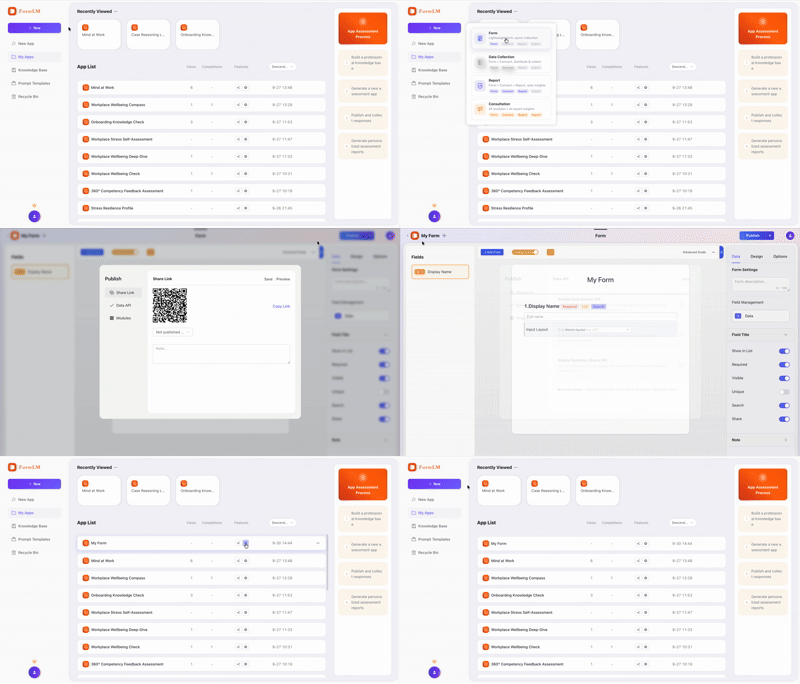
Hand Claude the endpoint URL. Create a form in FormLM, enable the Data API on the Publish tab, and paste the endpoint into the chat — with ?help appended. That URL returns a plain Markdown document listing every field, method, and example. Claude reads it, asks nothing, and starts POSTing valid records. No MCP, no CLI, no config file:
"Store your outputs here instead of writing files:
 https://formlm.me/api/v3/share/YOUR_TOKEN?help
 Read the documentation first, then submit each result."

# Claude fetches the Markdown docs, matches the field names,
# and POSTs structured records — on its own, every time.
Connect formlm-cli as an MCP server. Now Claude doesn't just store data — it can create forms, define fields, publish endpoints, and inspect results conversationally, with FormLM's domain rules embedded in every tool description. Setup differs slightly between the two Claude apps:
Claude Code — one command in your project:
$ claude mcp add formlm -- formlm-cli mcp
# starts the FormLM MCP server (8 tools + 6 resources)
# auth happens in-chat on first use: paste your Access Token (Account Settings), or email verification code, or email + password
Claude Desktop — edit the config file, then fully restart the app (macOS: ~/Library/Application Support/Claude/claude_desktop_config.json, Windows: %APPDATA%\Claude\claude_desktop_config.json):
{
  "mcpServers": {
    "formlm": {
      "command": "formlm-cli",
      "args": ["mcp"],
      "env": {
        "PATH": "/opt/homebrew/bin:/usr/local/bin:/usr/bin:/bin"
      }
    }
  }
}
The env.PATH line matters on macOS: Claude Desktop launches MCP servers without your terminal's PATH, so formlm-cli — installed via Homebrew Node — would otherwise fail with command not found. If it still fails, run which formlm-cli and use the absolute path as the command. Install the CLI first with npm install -g @formlm/cli; the full walkthrough lives in the developer zone.
$ curl -X POST https://formlm.me/api/v3/share/YOUR_TOKEN \
  -H "Content-Type: application/json" \
  -d '{
    "data": {
      "topic": "vector-db benchmarks",
      "verdict": "pgvector sufficient under 1M rows",
      "confidence": "high"
    },
    "meta": {"source": "claude-research-session"}
  }'

# Read — next session, Claude recalls everything it found
$ curl https://formlm.me/api/v3/share/YOUR_TOKEN/query?page=1&size=50
That's the whole pattern: persistent memory with zero infrastructure. CORS is enabled on reads and writes, so an artifact, a local HTML page, or a script Claude writes in the sandbox can all reach the endpoint. Stored records are also visible in FormLM's UI and exportable as CSV — the data belongs to you, not to the chat.
No. The zero-install route is to paste your endpoint URL (with ?help) into the chat. Claude reads the Markdown documentation itself and starts POSTing valid data. The MCP route adds more: with formlm-cli connected, Claude can also create forms, publish them, and manage everything conversationally.
Yes. Claude Desktop reads claude_desktop_config.json (macOS: ~/Library/Application Support/Claude/, Windows: %APPDATA%\Claude\). Claude Code is one terminal command: claude mcp add formlm -- formlm-cli mcp. Both connect to the same MCP server with the same eight tools.
Yes. Every stored record is queryable: the query endpoint pages through records as JSON, and the summary endpoint returns aggregate statistics. In a chat you can simply ask Claude to fetch and summarize what it stored earlier.
Claude Desktop launches MCP servers without your full terminal PATH, so Homebrew or nvm binaries are invisible to it. Add an env.PATH entry to the formlm block in claude_desktop_config.json, or use the absolute path of formlm-cli as the command. Then fully restart the app — MCP servers only load at startup.
Free to start — paste the URL into a chat, or connect the MCP server once and forget it.
Create your free endpoint →