Research summaries, drafted documents, cleaned spreadsheets — WorkBuddy delivers them into the chat, and there they stay. One endpoint turns every task outcome into a stored, queryable record.
WorkBuddy is built for office work at scale: it researches a topic, drafts the document, assembles the spreadsheet, runs the multi-step task — often with several agents in parallel. The output arrives in the conversation, maybe as an attached file. Then reality sets in: the research from last Tuesday is somewhere in scrollback, the vendor comparison lives in a file whose name nobody remembers, and "what did we conclude about supplier B?" restarts the whole investigation from zero.
The pattern that fixes it is older than AI: results go to a system of record. FormLM's Data API is a hosted endpoint that plays that role with zero setup — every task's outcome is POSTed as a structured record, fields auto-create on first submission, and everything is queryable over HTTP afterwards. The endpoint documents itself in Markdown at ?help, so the agent can discover the format without you writing a spec. Chinese content is fully supported — records are stored as UTF-8, in any language the task produces.
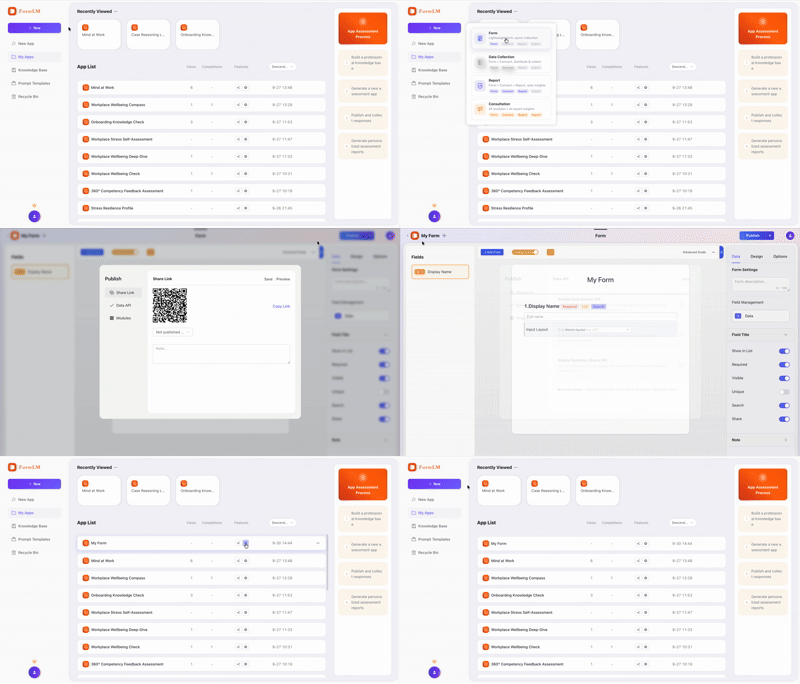
Put the endpoint in the task. Create a form in FormLM, enable the Data API on the Publish tab, and include the URL — with ?help appended — in your WorkBuddy instruction. The ?help URL returns a plain Markdown document: field list, request format, copy-paste examples. The agent reads it and submits correctly structured results on its own:
"Research the five vendors I listed. When finished,
 submit one record per vendor to this API:
 https://formlm.me/api/v3/share/YOUR_TOKEN?help
 Read the documentation first, then submit your
 findings with pricing, lead time, and risks."

# The agent reads the Markdown schema, matches the
# fields, and POSTs structured findings — every task.
If your WorkBuddy workspace exposes MCP support, the standard FormLM setup applies: install the CLI with npm install -g @formlm/cli, register it as an MCP server, and the agent gains tools to create forms, define fields, publish endpoints, and query results conversationally. The same formlm-cli mcp server works across Claude Desktop, Cursor, Codex CLI, Windsurf, and Cline — see the developer zone for the per-platform config files.
$ curl -X POST https://formlm.me/api/v3/share/YOUR_TOKEN \
  -H "Content-Type: application/json" \
  -d '{
    "data": {
      "vendor": "供应商B",
      "unit_price": 4.2,
      "lead_time_days": 14,
      "risk": "单一产地,雨季断供风险",
      "verdict": "备选"
    },
    "meta": {"source": "workbuddy-research"}
  }'

# Read — next week's task starts from these findings
$ curl https://formlm.me/api/v3/share/YOUR_TOKEN/query?page=1&size=50
Every record is visible in FormLM's data-management UI, exportable as CSV, and readable over the query and summary APIs — so "what did we conclude about supplier B" is one HTTP call instead of a re-run of the research. Chinese and mixed-language content round-trips correctly through POST, query, and export.
No. The endpoint is plain HTTP — paste the URL (with ?help appended) into your WorkBuddy task and the agent reads the Markdown documentation itself, then submits structured results. If your WorkBuddy workspace exposes MCP support, the standard formlm-cli MCP setup also applies.
Yes, fully. Records are stored as UTF-8 with no language restrictions — Chinese task output, mixed-language research notes, and CJK field names all round-trip correctly through POST, query, and CSV export.
An export is a snapshot you manage by hand. An endpoint is a live collection: every task appends structured records automatically, the query API reads them back on demand, and the summary endpoint computes aggregates — no file shuffling, no version confusion.
Yes. Every record is visible in FormLM's data-management UI, exportable as CSV, and readable over the query API. You see exactly what the agent submitted, when, and from which source — nothing hidden in a chat transcript.
Free endpoint, UTF-8 native, queryable by the next task.
Create your free endpoint →